I coded on a Tablet for more than a week
Was it Pain? Is Gitpod really good? Can a tablet replace a Laptop? Get some actual insights to real usage.
I went on vacation for more than a week and I'm honest upfront: I grew up coding so I'm having a really hard time not doing any coding at all in my vacation. It's my vacation so I do whatever I want. That might be swimming, that might be walking but it might be some coding as well 🧑🏽💻 🌞.
Is the Tablet too limited for doing any kind of work?
Well that's what we are going to evaluate. One thing is for sure: It always depends ... but I was more than amazed what was possible when finally things were running smooth.
First of all: No one needs a Tablet if you got a Laptop. I bought one for several reasons: Still lighter (12 inch, 567g) and thinner than basically any Laptop, fits even in the smallest places and runs the on-the-go Apps such as Netflix, Prime, etc. natively. So it can be a pretty cool mobile device, especially when you have a keyboard cover with it. Also I can just grab it and leave. As opposed to my Laptop which is at my desk connected with multiple cables and annoying to reattach honestly.
So tl;dr: It's more convenient to have a device laying around ready-to-go rather than grabbing a Laptop, its protection and potentially forgetting to bring the charger. With the tablet I can use my Smartphone charger as well.
Now this was a trip longer than a week and I was kinda scared of the experiment of not bringing a fully-equipped, terminal-running laptop that I am used to but you gotta experiment to find out.
The Hardware
In this Post I'm referring to my Samsung Tablet S8+, 12 inch (due to its 16:10 form factor it feels rather like an 11 inch iPad). This helps yourself to compare to tablets with weaker specs.
At work I use a 14 inch Macbook Pro.
Here's how it went, 10 days no Laptop
General Usage (Ergonomics)
Train, Bus, Plane, etc. are environments that do not have a lot of space. Using the Tablet here is pretty easy. However comparing it to a small laptop (~13 inch) it still looses the comparison because the Tablet is not as adjustable in it's position as the laptop (adjusting the tablet is dependent on the cover and the original keyboard cover from Samsung only has one position). But still, pretty solid and the tablet wins space-wise.
With a thin keyboard cover comes a thin keyboard. That however was surprisingly good. Sure you can't compare it to a MacBook Keyboard or even my Keychron. However I was surprised how good it felt because I expected somehow way less. Benefit: Pretty silent so you won't annoy anyone sitting next to you. So keyboard-wise it's pretty solid as well. And honestly if you bringing a clicky Keyboard on the Bus, Train or Plane is annoying everyone else anyway.
Bring a Mouse: On the train you won't need the mouse. The Pen is really awesome to click stuff and move the cursor to different places. It even supports hovering if you're roundabout 1inch from the tablet away which is neat. But if you wanna have a real comfortable session where enough room is provided the mouse will definitely light up your day, that's a promise.
Working with Direct Sunlight: Temperature and Readability
Apparently the Tab S8+ seems to go with 420nits Brightness. As a comparison: Most normal monitors go around 250/300 nits, the iPad Pro comes with 600 Nits and the Macbook Pro 2021+ at its peak can have more than 1000nits - compared to that 420 seems to be low for a Highend Tablet, but read yourself:
The good news is: You can kinda still work in direct, non-cloudy sunlight with the Samsung Tablet. But it comes with 2 downsides: It's really exhausting for your eyes and the Tablet will randomly close Apps if it gets really hot (and it does get hot in Summer). I would rather have the tablet stopping to work and telling me to go somewhere else rather than deciding for me to close Apps (mostly Chrome) which I found extremely patronising.
I compared it to an iPad Pro from someone else and the brightness in direct sunlight with the iPad is a huge benefit compared to my tablet (this difference however is barely noticeable in normal, shaded environments).
Screen Resolution / Multi-Window
- The Screen Resolution was really good for getting things done. I had a Gitpod window at kinda 70% of screen width and then below and aside another Browser Window at 60-70% as well.
Samsungs Tablet has 2 Working Modes: Normal Tablet Mode and the Samsung DeX (=Desktop) Mode. The latter one has a desktop-like look, a higher resolution and a better window management. Honestly I don't get why the resolution differs. Doesn't make sense to me. But either way I was only using DeX. If I recall correctly the reported resolution in the Browser was: 1400x876 Pixels.
- Samsung DeX is honestly pretty good and unique. You can kinda compare it to a Chromebook I'd say. You can open multiple windows and resize them and you can even make them opaque if you want to to see through. This allows you to make even more use of the constrained space. However it's not exactly the same as a Desktop. You cannot have multiple Chrome Windows open. I did find a Workaround however: If you use the Website as a PWA (Chrome: Add to Screen) you can have that Website running in its own Window.
Also I want to point out that as to my knowledge, at this point of time, the iPad does have the option for multiple windows but compared to the Samsung DeX it's way more limited as you can't arbitrarily move and resize windows and minimize or maximize them so I would have been propably frustrated not having Samsung DeX.
Coding, running Servers, the Terminal etc.
Hello Gitpod
I don't even know where to start. I don't even know if there is a competitor or not and I don't even care. Gitpod is just working so so well I can't really say a single bad thing about it.
I've known Gitpod for a very long time but I barely had good use-cases for it. Since the Tablet doesn't run a proper Terminal nor can I install npm packages or even start a server or use the git command line you definitely need something like a remote environment that can do this. And hot damn, Gitpod can.
You point to the Git repository on GitHub, GitLab, whatever. Then GitPod fetches it for you in a containerized environment. The spin-up takes like a minute.
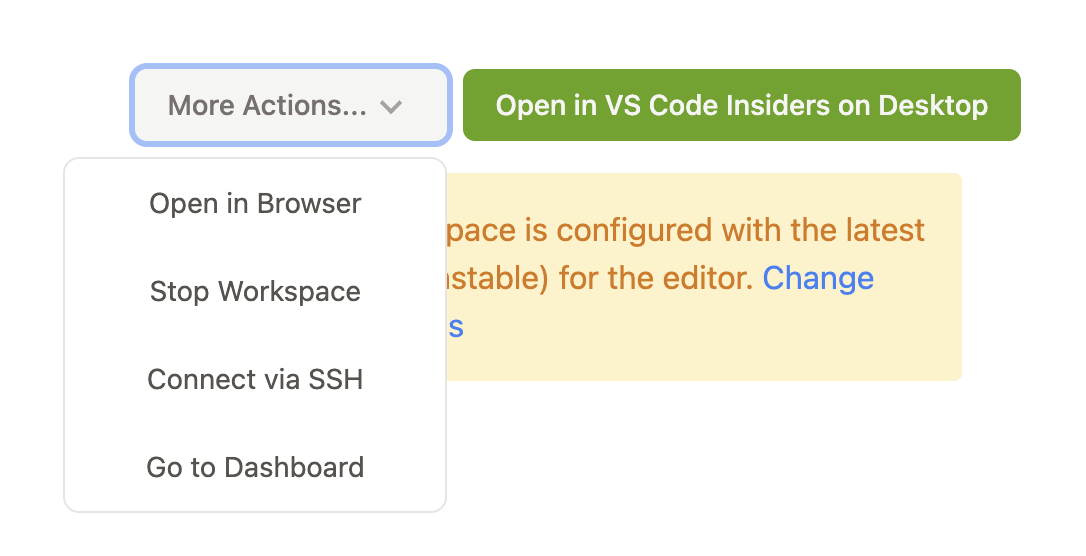
Then, on the tablet, you choose "Open in Browser" and it will run the Web Version of VSCode. You can even install Plugins, choose a Theme, etc.. It cloned my Next.js respository, I ran npm run dev in the Gitpod VSCode Terminal and it started the Next.js Server accessible for me on the Web, previewable either inside VSCode or in a new Browser Tab.
So my setup was: Add gitpod.io with "Add to Screen" as standalone Browser App and then have another Browser Window open where the Preview was.
I coded in one window and had a hot-reload preview in the other window. It felt like coding as always. Pure bliss 😍.
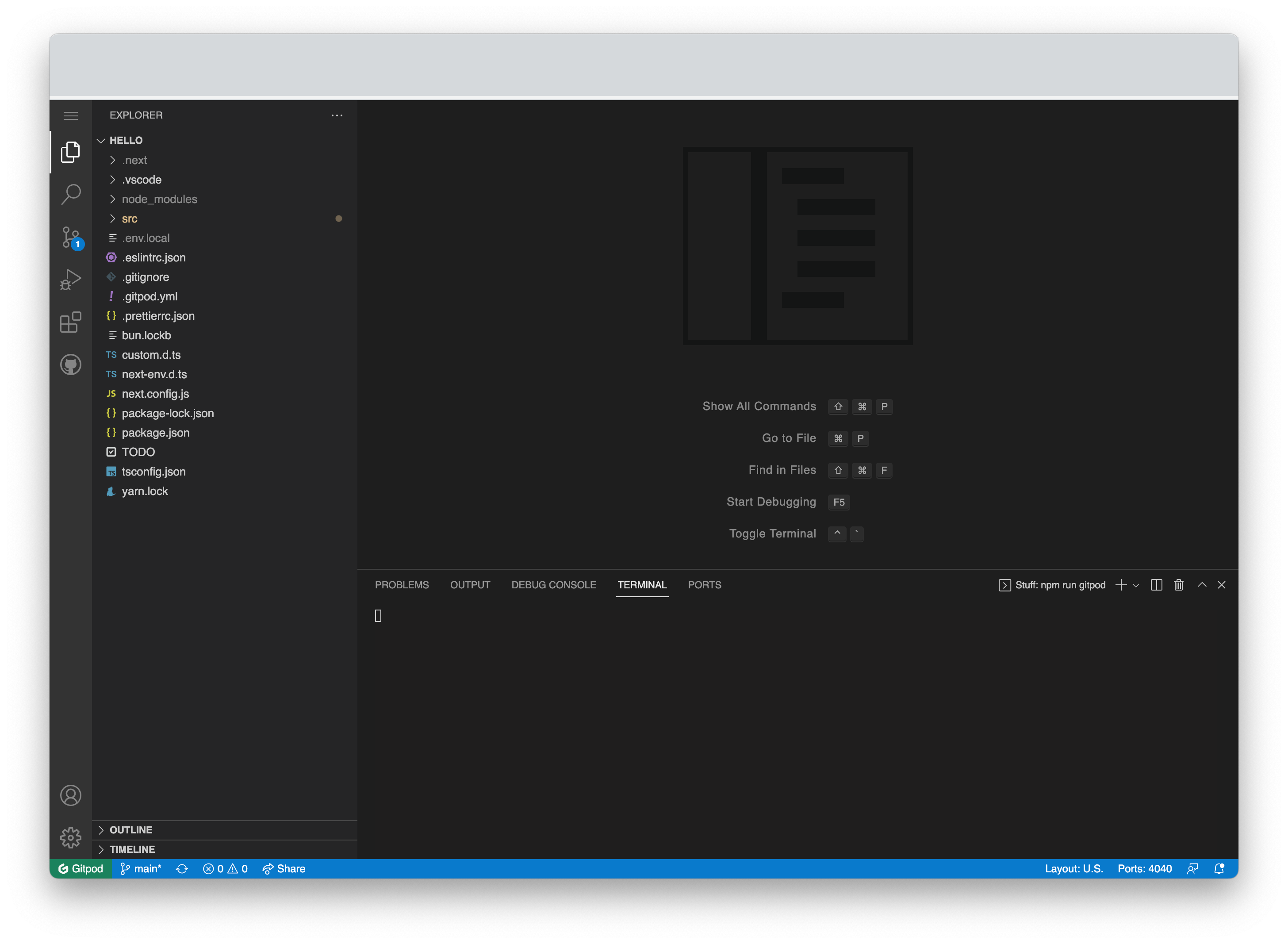
npm, yarn, bun, whatever you install in the remote environment will be available to you. I'm honestly not sure where the limit is but I didn't find it.
Now what I found even more amazing: You save bandwidth. Like a lot. Since npm install etc. runs on the Gitpod servers it doesn't take up any of your bandwidth. The only bandwidth it uses is your input when coding.
There is only 2 things I'd like to point out that aren't perfect:
The gitpod config yaml file sometimes didn't behave exactly like I expected it to. But maybe I haven't properly read the documentation and also the config yaml is no actual necessity so I'm not really wanting this to devalue the overall experience.
The App seemed to kinda perform well and try to sync when connection was bad when I was writing in the editor. But when I was writing in the terminal and connection was bad it kinda corrected back and forth which felt odd. But probably there's a reason behind it - I guess. And also this rarely happened.
How to inspect?
Short answer: You don't.
Longer answer: As opposed to some sources on the internet which claim that you apparently can activate the local inspector in Chrome even on Android I couldn't make it work. I didn't find the options and yes I do have Developer Mode activated.
So instead of just opening the inspector and checking the height of a box I kinda javascripted and alerted it - which worked but felt very inefficient. Which also means: All console.logs happening on the client are missed. The ones on the Server get logged in your Gitpod VSCode terminal.
You could however use a service like lambdatest.com or browserstack.com to open the Preview Link in a Remote Browser and then you'd be able to use the inspector there but that would rather be my last resort for bigger problems. Most often just alerting was okay.
But it's definitely not comforting, that's for sure.
Big Yikes
I don't get why the Samsung Tablet doesn't compete with the iPad Pro in Terms of Brightness (it can't be so hard to also just provide 600nits). This would've been a Game Changer.
I don't like the Samsung Politics of preinstalling stuff I don't want or need and not even letting me deinstall it. That's annoying as fuck.
Samsungs UX doesn't feel as straightforward as iOS. I love the finder, it's similiar to a Spotlight search in Mac or many Linux distributions. However there is so many more options to manage/open apps that I ask myself if maybe Samsung should hire a new UX Lead. Like there is a sidebar with Apps, then there is the normal App launcher, then the Finder, the Desktop itself obviously and probably more. Someone needs to clean this mess.
The fact that the Samsung Tablet manages heat by closing Apps is a big no-no for me. I mean my solution was to avoid direct heat (e.g. with a book in front of it) which worked well but the first time it was closing my Chrome was pain.
No inspector 😿 (so far, happy about any good tips here!)
Big Likes
- I had to get used to the "Pro Tablet Usage" at first which took like 3 to 4 days, adapting keyboard shortcuts etc. but thats a one-off so that was definitely worth it since I'm a "Pro User" now
- The Tablet Colors and Brightness in normal environments are really convincing.
- Switching between Apps with normal CtrlKey+Tab worked like a charm
- Multi-Window in Samsung DeX was really good and helpful
- Mobility
- Battery when it's not hot (I could watch 3 hours of offline Netflix and still have more than 50%)
- Gitpod 🫶🏾
Summary
At this very moment, with a tablet, you're bound to good internet. Besides Stuff like Notion that allows you to write stuff when you're offline or downloaded Music and Videos the Tablet without internet is pretty useless IMO as compared to a Laptop where you can have all your stuff on the filesystem.
However even if many of the above kinda sounded like raging the amazement was between the lines. I was amazed, given internet connection, how far you can get with a Tablet. Especially because it has a few advantages such as screenshotting and drawing with the Pen on the screenshot directly and then pasting that e.g. into a Web Design App such as Canva. Also working in GitPod was just so convenient that I barely noticed I was working on the Web Version. The only time I did was really when the internet connection wasn't stable.
So would I recommend working on a Tablet for Coding? I'd say if you wanna have the tablet convenience and you are not necessarily planning to code for 8 hours every day but rather like 2 or 3 I can definitely say that there is not much speaking against doing so on a tablet.
Would I replace a Laptop with a Tablet? Speaking for myself I don't see this happening in the near future. I want more resolution, I want even better window management (opening new windows in Chrome instead of new Tabs) and having a fully working inspector and full access to the terminal. Still it's awesome to know that I can have a fully working, seamless VSCode without my Laptop.
If you're planning on buying a Tablet for temporarily working I'd say: Wait for one with even better battery and maybe 550+ nits.
Comments
Join the discussionI have been using a Chrome OS tablet for small coding projects.
It supports Debian in a container, which allows me to run all my tools locally, even Docker.
I'm using the smaller Lenovo tablet, which is very portable. However I do wish I'd got the bigger version.
It's defo very convenient to stuff in the backpack when I go for a coffee, but not something I can use all day.
About to go on a weeks holiday so that should be a real test,
(I use Google Drive and Git worktree to share projects between my Mac Book and my Tablet)
I didn't knew of the Gitpod service. Thank you so much sharing your experience. Now I know that I can code with not only a tablet, but also a phone, a Chromebook and a not so powerfull laptop.
Yes!
And best of all: The Free Plan is already pretty much awesome!