unglitch - Ultra-Simple State Management for React
Stop thinking about side-effects, solve them with locked functions

Imagine this: You create your React or Next.js setup and you need a store to seamlessly share your data across components. This will very likely include some data fetching logic which provides the data to the store.
In the old days everybody would scream Redux and you'd check with some kind of state property if fetching data was already done or is currently being done. Nowadays we have Redux + a bunch of other options - same goal, different architectures.
The existing stores are awesome, partially damn easy (e.g. zustand) and do work fine.
But (!) stores do not solve side-effect problems
The problem is that within the React Lifecycle you can have the following situation: 3 components need data, hence 3 components make use of your custom hook useData and that hook checks in the store if data is already available e.g. with
// my custom hook
function useData() {
  const data = useZustand(state => state.data);

  useEffect(() => {
    if (!data) {
     fetchData().then(/** some fetching logic **/);
    }
  }, [data]);

  return data;
}
But this is troublesome - and I am unfortunately seeing this more and more on websites: The data is being fetched multiple times, multiple requests are sent. The reason is easier explained by providing some visual help in the following diagram:
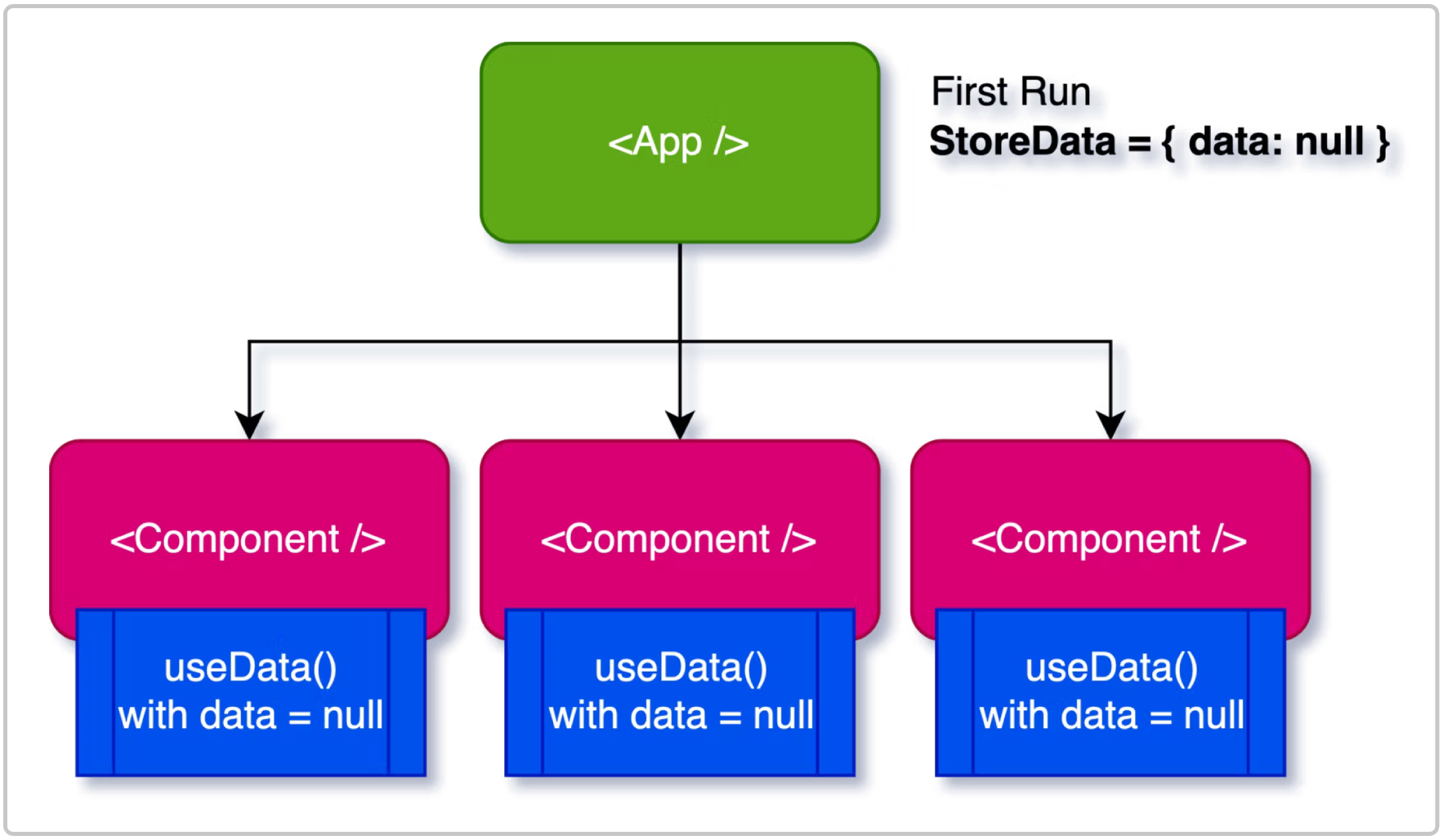
All components are using the hook useData(). And useData in that lifecycle will have empty state data. Still the useEffect() of useData() will be called 3 times as we have 3 components using it - reminder: Reused hooks are not Singletons. And the problem continues: You cannot really check the provided state data as you get the state of this lifecycle so another component might've called the fetching function but the other components will be notified in the next lifecycle run and hence also trigger fetching the data.
This is not a React problem
Now it might sound like "Isn't this bad as per architecture?". No. You get a state per lifecycle across your components such that all components will have the same, in-sync-state which is required for your components not to behave weird.
It's your problem: You need to orchestrate
At the end of the day you have to avoid that functions running outside of the React lifecycle (such as data fetching methods) will be ran multiple times. This is possible with all major State Management Libraries because they do update the state before components get notified.
E.g. in Redux (with redux-thunk) you'd have your reducer something like:
dispatch((dispatch, getState) => {
  if (getState().isFetchingData === false) {
    fetchData().then(data => dispatch({
      action: 'UPDATE_DATA', payload: data
    }));
  }
});
or in zustand you could build it like this:
const store = create((set, get) => ({
  isFetchingData: false,
  fetchData: () => {
   if (get().isFetchingData === false) {
     fetchData().then(data => set({data}));
   }
  }
}));
Works but also is additional if-overhead - and you have to remember to do it.
unglitch provides Lock-or-Leave calls
I wanted a simple state management solving that problem. I could've adapted zustand but then I went with digging into building an even simpler system: unglitch.
unglitch is pretty similiar to zustand and it kinda uses the same technology. However built-in with the State Management do come locked calls.
It's easiest explained with the following code snippet:
import { useStore, update } from './my-store';

const fetchData(releaseLock: () => void, realtimeData) {
  // we can check the live data outside of the lifecycle
  if (realtimeData === null) {
    // ..fetch some data...
    // ...then update it:
    update({ data: [/** your data here */]});

    // release the lock so it can be called again
    releaseLock();
  }
}
fetchData.LOCK_TOKEN = "FETCH_DATA";


const useData = () => {
  const [data, lockedCall] = useStore(state => state.data);

  useEffect(() => {
   lockedCall(fetchData);
  }, []);

  return data;
}
The LOCK_TOKEN is grabbed automatically when you run the lockedCall. If the LOCK_TOKEN is not present you will be facing an error so don't worry about forgetting it. Sure, you could still manually call that function but as long as you run lockedCall it will take care of running it only once.
The function that is being called always receives a function as first parameter that will free the lock again and the second parameter is exactly the provided state data in useStore so here it is state.data.
The difference is however: The function that is being called receives the realtimeData and not the data that is currently available in the lifecycle. This allows you to check if you need to fetch data or not.
Besides this lock mechanism the store works pretty much similiar to zustand. Check it out.
Comments
Join the discussionNo comments yet. Be the first to comment.